How brokerages capture and nurture more website leads
Turn more website visitors into clients with proven lead capture, fast follow-up, and nurture systems brokerages can scale.



Brokerage websites don’t have a traffic problem – they have a handoff problem.
A visitor hits an IDX listing, asks a question, saves a property, maybe even requests a showing. Then one of three things happens:
- The lead sits untouched for hours
- The wrong person gets it
- The follow-up is generic, late, or both
If you want more real estate brokerage website leads, the answer usually isn’t “drive more clicks.” It’s building an operating system that turns high-intent moments into conversations, conversations into appointments, and appointments into clients.
Think of this like an ops manual: capture → route → respond → nurture → measure. Here’s how to build it.
What “website leads” mean for a brokerage (and what to track)
Not all website leads are created equal, and treating them the same is the fastest way to waste your best opportunities.
Lead types that actually matter
Most brokerages have at least four inbound categories:
- Buyer leads from IDX browsing, listing questions, saved searches, and tour requests
- Seller leads from home valuation tools, “what’s my home worth” pages, and selling guides
- Recruit leads from careers pages, recruiting funnels, and agent interest forms
- Referral leads from contact pages, relocation pages, and partner traffic
Operationally, these are different pipelines: hey need different routing rules, scripts, and nurture tracks.
The KPI stack: what to measure weekly
If you only track leads, you’ll optimize for volume instead of outcomes. A practical scorecard usually includes:
- Website conversion rate (visitor → lead)
- Speed-to-lead (time from inquiry to first response attempt)
- Contact rate (two-way conversation started)
- Appointment set rate (appointments per lead, by lead type)
- Cost per lead (and cost per appointment if you run paid traffic)
Why speed-to-lead deserves its own line item: there are huge drop-offs in qualification as response time increases, with especially sharp declines after the first few minutes. In fact, we ran our own study to show this… with surprising results.
Practical benchmark: set an internal goal of under 5 minutes for your first response attempt during coverage hours, then measure it like you mean it.
How to capture real estate brokerage website leads (without killing UX)
Lead capture is a balancing act: you want contact info, but you also want the visitor to keep browsing. The best systems earn the ask by matching the gate to the intent.
IDX gates without the rage-quit
An IDX lead capture strategy usually works best when you gate based on intent signals, instead of just page views alone.
Common gate moments that tend to convert without wrecking UX:
- After a visitor saves a listing
- When they request saved search alerts
- When they ask to see similar homes
- When they click schedule a tour
- After they view multiple listings in the same area
If you gate too early, you get more leads that never respond. If you gate too late, you lose the chance to start a conversation when intent is highest.
High-intent CTAs that produce better leads
A lot of broker sites rely on one CTA: “Contact us.” That’s low clarity and low intent.
Instead, add a small set of CTAs that map to what people are already trying to do:
- Schedule a tour (highest buyer intent)
- Get price drop alerts (great for long-term nurture)
- Save this home (micro-commitment that drives capture)
- Ask a question about this listing (high context, easy follow-up)
- Get a home value estimate (seller intent)
If you use chat, treat it like your front desk: capture intent and context first, then route it cleanly. Roof AI’s approach to conversational capture is built around qualifying in real time and handing off rich context so agents can follow up like humans, as opposed to form letters.
Form friction rules and microcopy that increases completion
A simple rule set for brokerage forms:
- Ask for name, email, phone first, then progressive-profile later
- Use one primary CTA per page section
- Make the form feel low-risk with microcopy like “No spam, just the info you requested”
- Add social proof near the CTA (ex. reviews, “serving X local communities”)
- On listing pages, pre-fill the message with context (address, MLS, question type)
Speed-to-lead playbook for teams
Speed-to-lead is not a motivation problem, it’s a systems problem.
Routing rules by intent, geography, and availability
Start with a routing matrix that answers three questions:
- What is the intent? (buyer tour request vs. seller valuation vs. recruit)
- Who is eligible? (coverage schedule, location, language, specialty)
- What happens if no one accepts? (fallback, escalation, recycle)
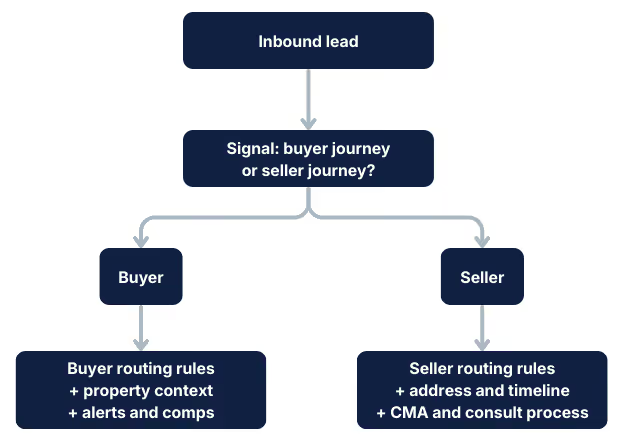
Here are three simple routing diagrams you can implement with most stacks.
Diagram 1: Business hours vs. after-hours
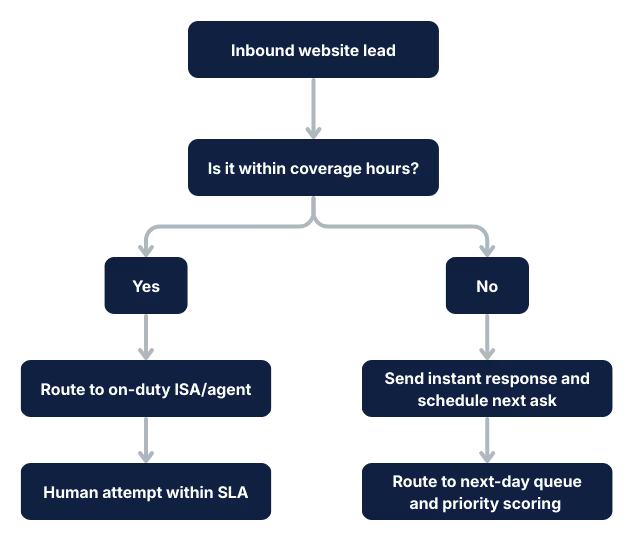
Diagram 2: ISA vs. agent handoff
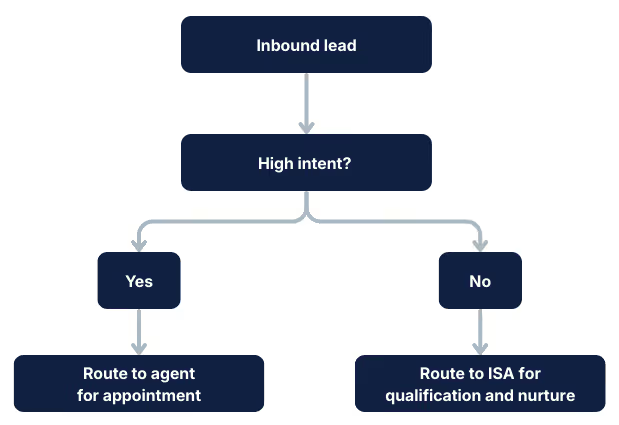
Diagram 3: Buyer vs. seller track
Instant response plus human handoff
Your first response should do two jobs:
- Confirm you received the inquiry and set expectations
- Ask one easy next question that invites a reply
Example “instant response” (SMS or chat):
“Got it – I can help. Are you looking to tour this home, or would you prefer a few similar options in the same price range?”
Then your human follow-up should reference the context:
- The listing they viewed
- The neighborhood page they spent time on
- The action they took (save, alert, tour request)
SLA and weekly scorecard
Set an SLA that ops can enforce.
Speed-to-lead SLA example
- New inbound lead: First response attempt in under 5 minutes during coverage hours
- Second attempt: Within 30 minutes
- Minimum attempts day 1: 3 attempts across 2 channels
- Day 1 outcome: Appointment set, nurture enrolled, or explicitly disqualified
Weekly scorecard template (track by team and by lead type)
Nurture architecture: segments, cadences, and “value loops”
Most nurture fails because it’s one-size-fits-all – your nurture system should look like a set of tracks, not a newsletter blast.
Buyer vs. seller tracks
At minimum, separate:
- Buyer short-term (0-14 days)
- Buyer long-term (1-24 months)
- Seller short-term (0-30 days)
- Seller long-term (1-24 months)
- Recruit nurture (agent pipeline)
A 14-day hot lead cadence (buyer version)
Goal: start a conversation and set an appointment without feeling spammy.
- Day 0: Immediate SMS and email with the listing context they asked about
- Day 0: Call attempt within SLA
- Day 1: SMS that offers two options (tour vs similar homes)
- Day 2: Email with 3 relevant listings and a question about timing
- Day 3: Call attempt plus voicemail referencing the specific home
- Day 5: SMS with a single “yes or no” qualifier (ex. “Still looking in X area?”)
- Day 7: Email with a “short list” and a scheduling link
- Day 10: Call attempt
- Day 14: Breakup message that gives them an easy out and keeps the door open
A 6-month long-term nurture cadence (buyer version)
Goal: stay useful until intent spikes again.
- Week 1: Set up alerts and ask for must-haves
- Week 2: Neighborhood guide email mapped to where they browsed
- Month 1: Market update for their target area
- Month 2: “What your budget gets you” snapshot
- Month 3: Financing readiness content and next-step CTA
- Month 4: New listings and price drops summary
- Month 5: “Still planning to move this year?” check-in
- Month 6: Re-qualification message and calendar CTA
If you run email drip campaigns, keep sequences intent-based, personalize where you can, and measure replies and conversions, not just opens.
Seller cadences (quick starter)
Seller nurture should center on confidence-building:
- Pricing clarity
- Timing strategy
- Local proof and process explanation
- A clear path to a consult
Automation that doesn’t feel robotic
Automation feels robotic when it ignores context, but it feels helpful when it reacts to behavior.
Behavioral triggers that are worth implementing
- Returning to the same listing multiple times
- Favoriting or saving properties in one neighborhood
- Clicking valuation results
- Repeated visits to “buy” or “sell” pages
- A tour request that didn’t get scheduled
Trigger messages should be short and specific:
- “Noticed you came back to 12 Front St. again – want to see it this week, or should I pull a few similar options?”
Concierge and ISA workflows
A simple division of labor:
- Automation: instant response, capture, reminders, behavior-based prompts
- ISA: qualification, timing, financing readiness, appointment setting
- Agent: consult, negotiation, relationship building, closing
Conversion boosts on key pages
You don’t need a full redesign to increase conversion – you need targeted improvements where intent concentrates.
Listing pages
A quick teardown checklist for a typical IDX listing page:
- Put the primary CTA (schedule a tour) above the fold on mobile
- Add a secondary CTA (get similar homes) for non-tour visitors
- Use microcopy that reduces anxiety (ex. “No pressure, just answers”)
- Add proof near the CTA (reviews, local expertise, response time promise)
- Delay hard gating until a meaningful action (save, tour, alerts)
Community pages and valuation pages
- Community pages: add “Get alerts for this area” and “Ask about schools and commute”
- Valuation pages: ask for timeline and motivation, then route to seller track
A/B tests to run first
- CTA language (schedule a tour vs. book a showing)
- CTA placement (sticky mobile footer vs. in-content)
- Form length (short vs. progressive)
- Social proof blocks (reviews vs. stats vs. logos)
Lead accountability inside the brokerage
Lead conversion improves fast when ownership is clear.
Round robin vs. performance routing
- Round robin is fair, but not always effective
- Performance routing rewards fast responders and strong converters
A hybrid approach also works well:
- Start with performance routing for high-intent leads
- Use round robin for lower-intent leads that need ISA qualification
- Recycle leads when SLAs are missed
Lead recycling and coaching loops
Build a lightweight QA rhythm:
- Weekly “missed SLA” review
- Random sample of first messages for tone and specificity
- Call review for appointment setters
- Coaching tied to the scorecard, not vibes
This “operating model” mindset is how you keep automation and humans aligned over time: systems, visibility, governance, and continuous improvement.
Compliance checklist for email and SMS follow-up
Compliance is not a footer – it’s a workflow.
CAN-SPAM essentials (email)
The FTC’s CAN-SPAM guide is the reference point for the core requirements, including accurate header information, non-deceptive subject lines, clear identification when required, a valid physical address, and a functioning opt-out that’s honored promptly.
Operational checklist:
- Every email includes a visible unsubscribe mechanism
- Unsubscribes sync back to your CRM and suppression lists
- Your “From” name and subject lines match the content
TCPA consent capture and recordkeeping (SMS and calls)
TCPA compliance is nuanced, and it changes through rulemaking and litigation. The FCC’s one-to-one consent rule was set to take effect in January 2025, then delayed, vacated by the Eleventh Circuit, and later removed from the FCC’s rules in 2025.
What doesn’t change: you still need the right level of consent for marketing texts and calls, and you need to prove you have it.
Where consent language should live:
- On the form or chat capture step where phone is collected
- In a dedicated CRM field (ex. consent status, timestamp, source URL, and language version)
- In an audit trail your team can export if challenged
Example consent checkbox copy (adapt with counsel):
“By checking this box, you agree to receive calls and texts about real estate services at the number provided, including via automated technology. Consent is not a condition of purchase. Reply STOP to opt out.”
Opt-outs, templates, and audit trail hygiene
- Every SMS template includes an opt-out instruction
- STOP requests immediately suppress further messaging
- Keep records of consent language versions over time
The brokerage operating system that scales
If you want more real estate brokerage website leads, stop treating lead gen as marketing’s job and start treating it like an ops pipeline.
Build the system:
- Capture intent without wrecking your UX
- Route leads based on rules, not hope
- Respond fast with context
- Nurture by segment and timeline
- Measure weekly and coach continuously
- Bake compliance into the workflow instead of the footer
If you want to see what this looks like when conversational lead capture, routing, and nurture work together end-to-end, check out Roof AI.